GET STARTED
Here you’ll find answers to questions about getting started with your fan convector.
How do I start my fan convector (UL-C/ULS-C) for the first time?
Set the fan speed dial to Auto.
Set the thermostat halfway between + and –.
Plug in the unit and let the convector complete its startup before making any adjustments on the control panel.
How do I set the correct temperature on the Omnia UL-C/ULS-C?
When the dial is set halfway between + and –, the temperature is set to 20°C in heating mode and 25°C in cooling mode. Each step between the markings equals 2°C.
How do I know if the fan convector (UL-C/ULS-C) is heating or cooling?
A blue light indicates cooling mode, and a red light indicates heating mode.
OPERATION & FUNCTION
Below you’ll find answers to questions about the operation and function of your fan convector.
Can I use a fan convector as the primary heat source?
Yes, you can. However, depending on the size of the area to be heated, you may need multiple units for optimal performance.
Why should I choose a fan convector from Aermec?
Aermec’s fan convectors have a simple design, which reduces the risk of malfunctions. They are also quieter than many other options on the market.
Are fan convectors noisy?
It depends on what you compare them to. If you’re looking for a quiet solution, Aermec’s fan convectors are a good choice as they operate at a relatively low noise level.
Can a fan convector be used for cooling?
Yes, a fan convector can both heat and cool.
MAINTENANCE
Here you’ll find answers about how to maintain your fan convector.
How often should I clean the filter on my fan convector?
It depends, but it’s a good idea to check the filter from time to time to make sure it’s not clogged. If you have a lot of dust or pets, you’ll need to clean it more frequently.
How do I clean the filter?
Normally, vacuuming is sufficient, but if the filter is very dirty, you can gently rinse it with lukewarm water. Let the filter dry completely before putting it back.
Does a fan convector need servicing?
No, regular cleaning of the filter is usually sufficient.
COMMON ISSUES
Below you’ll find solutions to common issues that may occur with a fan convector.
Water is dripping from the unit – what should I do?
Check the water connections. If the convector is used for cooling, also check the condensate drain. It’s normal for condensation to form on the casing when humidity is high and the supply water temperature is very low. If this happens, try adjusting the supply temperature.
The fan is running but no heat is coming – what’s the cause?
This may be due to a clogged filter or a lack of hot water in the convector. Try cleaning the filter and check whether the heat pump is calling for heat.
The unit is noisy – is that normal?
If the fan convector is louder than usual, there may be a problem – for example, with a bearing or a loose fan wheel. Contact us if you suspect your convector is faulty.
My fan convector (FCW) won’t start heating – what should I do?
Check the heat pump. The problem is often that the water hasn’t reached the correct temperature yet.
Also make sure the fan convector has power.
My fan convector (UL/UL-C) won’t start – what should I do?
1. Start by opening the air deflector.
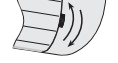
2. Check the fuse on the incoming power supply.
INDICATOR LIGHTS – OMNIA UL, UL-C AND ULS
Here you can read about what the different indicator lights on the Omnia UL, UL-C, and ULS fan convectors mean.
The light is flashing red – what does it mean?
If the light on your fan convector is flashing red, it most likely means the control panel needs to be replaced.
If the light is flashing red with occasional blue, try the following steps:
- Unplug the unit so it has no power
- Set the fan speed to Auto
- Set the temperature between + and –
- Plug the unit back in and don’t touch anything
- Wait until the convector has restarted
The light is flashing red/blue (purple) – what does it mean?
When the light flashes purple, the fan is not running. This often happens when the convector detects a demand for heat, but the heat pump does not. As a result, the water doesn’t get warm enough for the system to start. This issue is common in early spring and autumn.
The purple light can also flash when the water flow is insufficient, which may require adjustment.
Red light on = Heating mode (water above 27°C)
Red light flashing = Frost protection mode
Blue light on = Cooling mode (water below 16°C)
Purple light flashing = Fan not running
The light is flashing yellow/white – what does it mean?
When the yellow light flashes, it means the room sensor on your fan convector is faulty.
Yellow light on = The room temperature differs from the desired temperature, requiring airflow.
Yellow light off = The air deflector is closed, and the fan function cannot be used. If the air deflector is open but the yellow light is off, the thermostat is in standby mode or no airflow is currently needed to adjust the temperature.
Can you turn off a light on the ULS-C?
Yes, set dipswitch 12 (2) to On.
Note: This should only be done by a qualified person.
INSTALLATION
Here we’ve gathered questions about installing fan convectors.
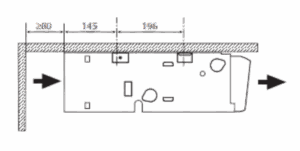
Can the Omnia UL be mounted on the ceiling?
Yes, the Omnia UL fan convector from Aermec can be mounted on the ceiling as shown in the image below.
FAN CONVECTORS & SPARE PARTS
Here you’ll find answers if you’re looking to buy a fan convector or spare parts.
Can I buy a fan convector from Aircoil as a private customer?
No, all fan convector sales go through resellers, but you can buy spare parts directly from us.
Which fan convector is most efficient for home use?
All models (Omnia UL, Omnia Slim, and FCW) are efficient for home use. You can choose the model that best suits your needs, depending on where the fan convector will be installed.
What should I consider when choosing a fan convector?
- A fan convector provides 50 W/m² of heating output. For example, if your area is 70 m², you’ll need at least 3,500 W (50 × 70 = 3,500).
- If the unit will be placed in a large room, it’s better to use several convectors rather than one large unit.
- In noise-sensitive rooms, choose a model slightly larger than necessary, since a fan running below maximum speed will operate more quietly.
Do you have spare parts for the Omnia (UL/UL-C/ULS) fan convector?
Yes, we keep the most common parts in stock in Årjäng, and if we don’t have the part you need, we can order it for you.